
The essential takeaway: Google Business Profile eligibility depends entirely on verifiable in-person contact with customers during stated hours. Purely online operations, lead generation sites, or unstaffed virtual offices do not qualify and risk immediate removal. Success requires proving a physical presence—either by welcoming clients at a storefront or visiting them locally—to avoid suspension and ensure long-term visibility.
Most business owners blindly assume they automatically qualify for a local listing until a sudden suspension notification proves they unknowingly violated the strict Google Business Profile eligibility requirements.
We are cutting through the conflicting advice to clearly define exactly which business models actually survive Google’s manual scrutiny and which specific mistakes trigger an immediate rejection or hard suspension.
Stop gambling with your local visibility and use our definitive checklist to validate your business model right now before a single hidden compliance error permanently costs you real customers and valuable market share.
- What “Eligible” Actually Means in Google’s Eyes
- The 3 Eligible Business Models
- Businesses That Are Strictly Not Eligible
- Address rules: what you can list and what will get you nuked
- Ownership and representation requirements
- Your Pre-launch Eligibility Checklist
- Grey Zones and Edge Cases (Where People Get Suspended)
- What to Do if Google Marks You Ineligible
What “Eligible” Actually Means in Google’s Eyes
The One Rule That Matters Most
Everything hinges on one non-negotiable concept: in-person interaction. If you don’t meet customers face-to-face during stated hours, you likely don’t qualify. This is the bedrock of Google Business Profile eligibility requirements. Without physical contact, the profile shouldn’t exist.
Ignoring this specific rule causes most suspensions I see. Consider this the strict gatekeeper of the entire local ecosystem.
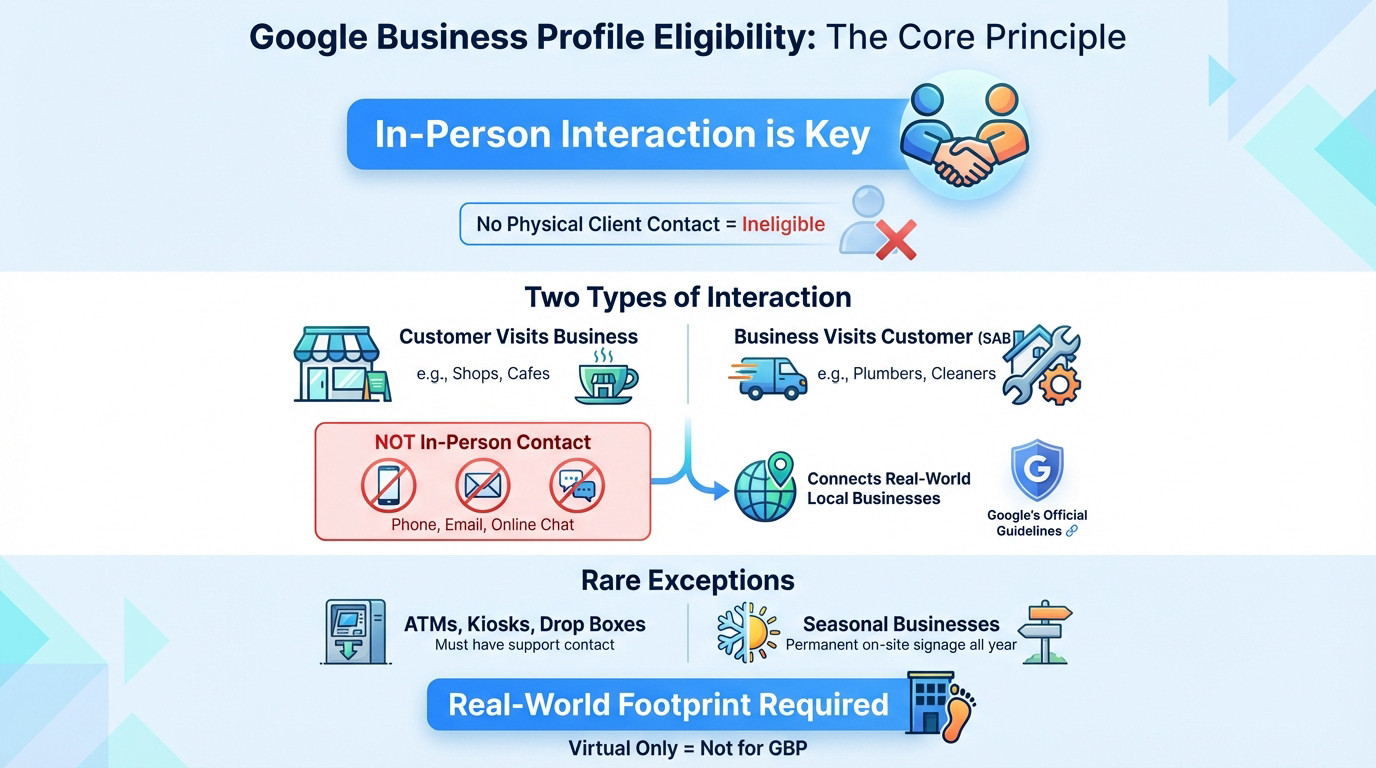
This interaction happens in two distinct ways. Either they come to your door, or you travel to theirs. These define the only business models Google accepts.
Defining “In-Person Contact” for Your Business
First, you have the classic storefront model. Customers physically walk into your location during open hours. Think of a coffee shop or a dental clinic.
Second, you might visit the customer’s location instead. This defines the Service-Area Business (SAB) model. Plumbers and cleaners fit perfectly here.
Digital communication does not count here. Phone calls, emails, and Zoom chats are not in-person contact. Google explicitly states the business must exist in the real world. Check Google’s official guidelines for confirmation.
The Few Exceptions to the Rule
Google allows a handful of specific exceptions. ATMs, video rental kiosks, and express mail drop boxes can qualify. However, you must list contact information for help. Without that support channel, they remain ineligible.
Seasonal businesses like winter ice rinks also get a pass. But they must display permanent signage at the location year-round to stay compliant.
The core principle remains: your business must have a real-world footprint. If your entire operation is virtual, Google Business Profile is simply not the right tool for you.
The 3 Eligible Business Models
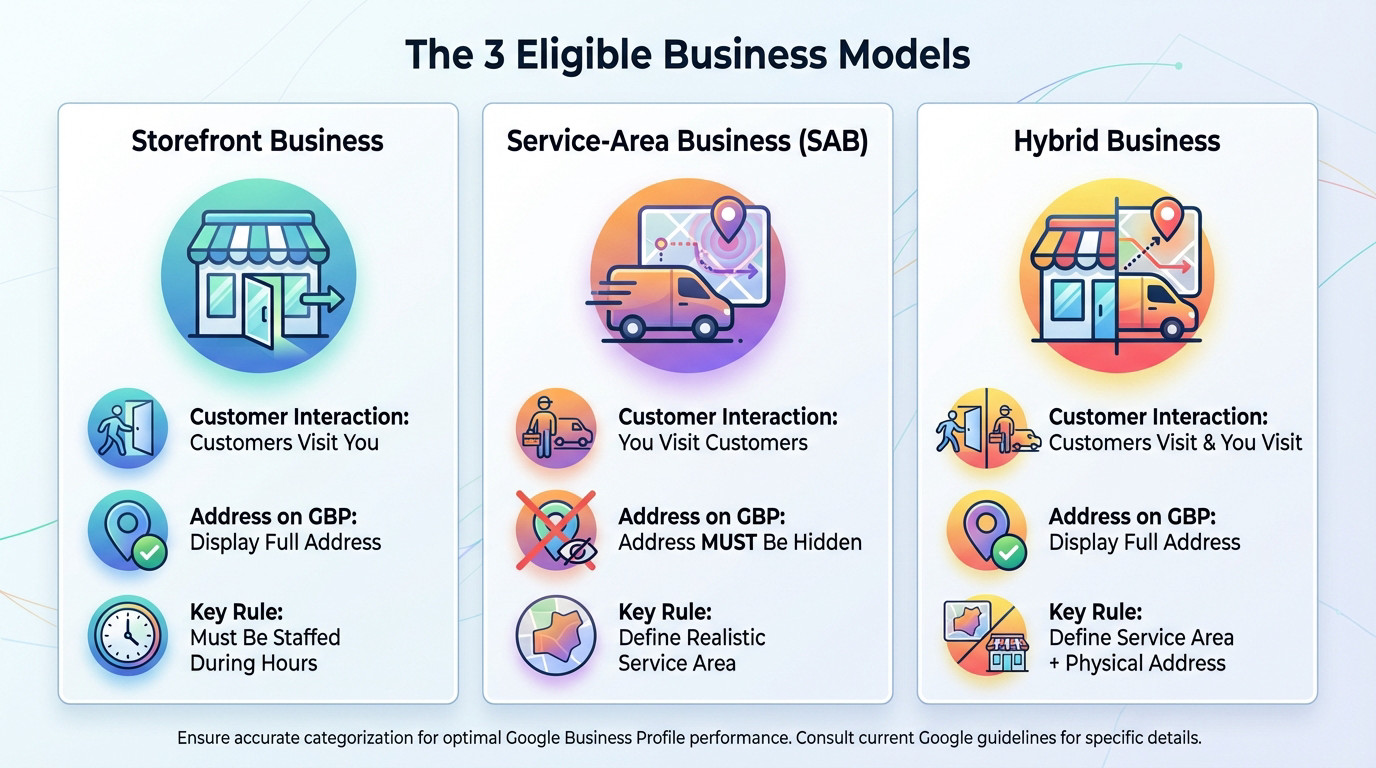
Now that the core Google Business Profile eligibility requirements are clear, let’s see how they apply concretely to the three types of businesses that Google recognizes.
Storefront Businesses: Customers Visit You
This is the standard model where you have a physical location. Customers walk through your doors during stated business hours. It is the most straightforward way to meet storefront eligibility.
Think of a restaurant, a local law firm, a retail store, or a hair salon.
Your address must be accurate, and staff must be physically present to serve people. A permanent sign is required, but signage alone is not enough without staff.
Service-Area Businesses (SABs): You Visit Customers
A SAB does not welcome clients at a business address. Instead, you travel to the customer to provide your services. Common examples include local plumbers, landscapers, pest control experts, or mobile cleaning crews.
The golden rule here is that you must hide your physical address on the profile. Displaying a residential address is a massive red flag that triggers immediate suspension.
Instead of a pin, you define specific service areas like cities or postal codes. Check Google’s guidelines for service areas.
Hybrid Businesses: A Mix of Both
The hybrid model applies if you have a staffed physical storefront AND you travel to visit customers.
A classic example is a pizza restaurant. They have a dining room for sit-in guests (storefront) but also employ drivers to deliver food directly to homes (SAB).
| Business Model | Customer Interaction | Address on GBP | Key Rule |
|---|---|---|---|
| Storefront | Customers visit your physical location | Display your full, accurate address | Must be staffed during stated hours. |
| Service-Area (SAB) | You travel to the customer’s location | Address MUST be hidden | Define a realistic service area. |
| Hybrid | Both: customers can visit AND you travel to them | Display your full, accurate address | You must define a service area in addition to your physical address. |
Businesses That Are Strictly Not Eligible
Now that the eligible models are clear, let’s talk about the businesses Google systematically rejects. Knowing this specific “no-go” list will save you from wasting hours on a setup that is doomed to fail, or worse, triggering an immediate suspension.
The Official Ineligible List, in Plain English
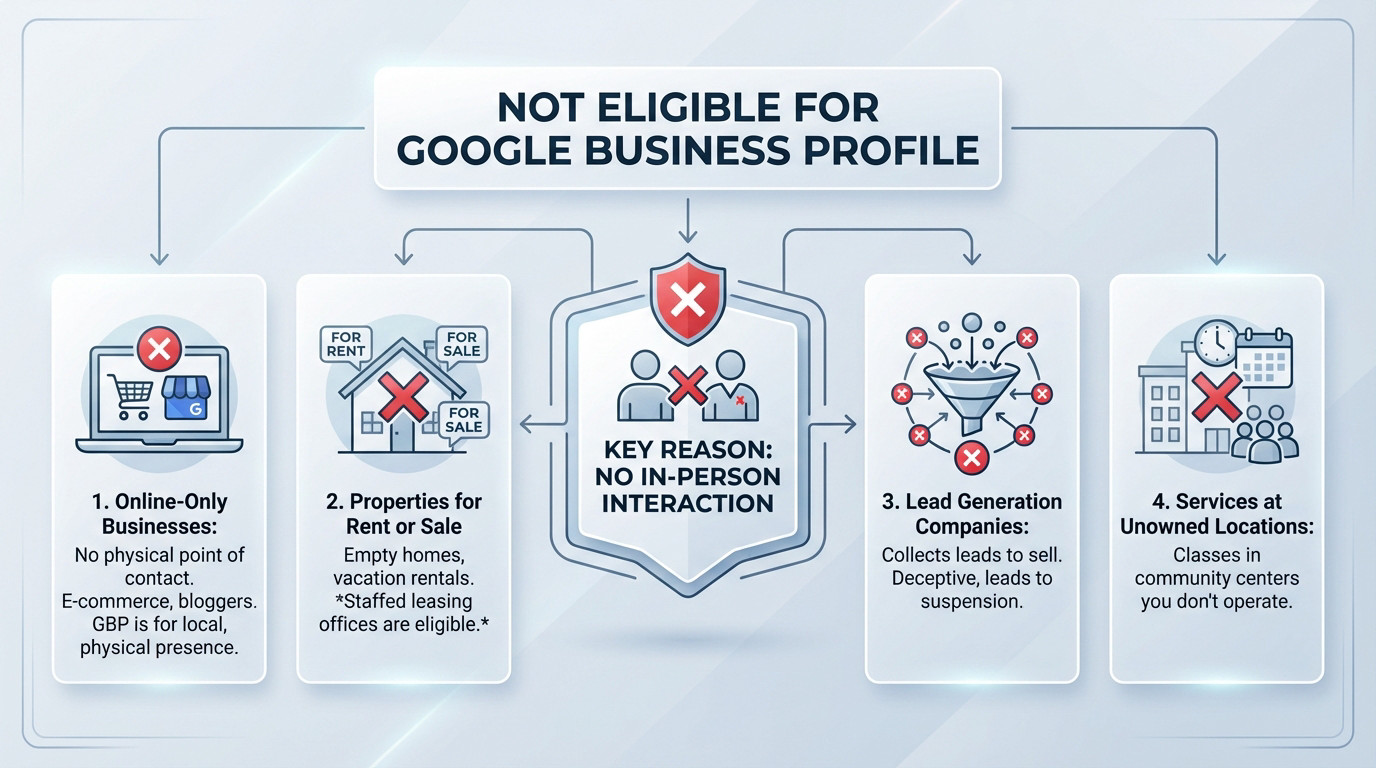
Google maintains a rigid list of business types that simply do not meet the Google Business Profile eligibility requirements, regardless of how creative you get with the guidelines. The common denominator here is always the same: a complete lack of face-to-face interaction.
- Online-only businesses: E-commerce stores, bloggers, or any digital brand operating without a physical point of contact.
- Properties for rent or sale: Listings for vacation homes, empty apartments, or houses for sale are not allowed. However, a staffed leasing office is eligible.
- Lead generation companies: Businesses that exist only to capture leads and sell them to other service providers.
- Services at a location you don’t own or represent: Such as a recurring class held in a community center you don’t operate.
For the full breakdown, check Google’s overview of policies and eligibility.
Why Online-Only Businesses Don’t Qualify
This is the most frequent trap entrepreneurs fall into. GBP is fundamentally a “local” tool designed to guide pedestrians to a physical door or connect neighbors with a local service. If your business model is purely digital, you simply do not fit the ecosystem.
Even if you sell products to people in your own city, without a storefront they can visit or a team that delivers to them, you are not eligible. Shipping goods via mail doesn’t count.
Let’s be blunt: if your business lives 100% on the internet, GBP is not for you.
The Problem With Lead Generation Listings
Google has declared war on lead generation profiles. These are listings that pretend to be a legitimate local outfit but exist solely to harvest customer data and sell it to third-party contractors. They clutter the map and frustrate users.
Think of a profile named “Plumbers in Paris” that isn’t actually a plumbing company, but rather a marketing site funneling distress calls to five different subcontractors. That is strictly prohibited.
Google views this as deceptive behavior. If you operate this way, expect your profile to be suspended rapidly.
Address rules: what you can list and what will get you nuked
Your business model might be solid, but a messy address setup is the fastest way to kill your ranking. It is the number one failure point for new registrations.
Your address must be real and precise
You need to follow the golden rule here. Your listed address must be precise, exact, and match the physical location. No guessing games allowed. Google uses this specific data to pin you on Maps.
Consistency is everything for verification. The address on your Google Business Profile eligibility requirements checklist must match your website, business license, and real-world signage perfectly. It must be identical.
Any mismatch here is a massive red flag that screams “fake listing” to Google.
Common address mistakes that trigger suspensions
Let’s look at the traps that destroy listings. The first is using PO Boxes or mailboxes at stores like UPS. This is explicitly forbidden by policy and leads to an almost immediate suspension. It is a guaranteed way to fail.
Let’s talk about virtual offices. This is a high-risk zone. If you do not have permanent staff there to greet customers during stated hours, that address is not eligible.
Using a virtual office or PO Box isn’t a clever workaround; it’s a direct violation of Google’s core principle of representing your business as it exists in the real world.
Address rules for service-area and hybrid businesses
For SABs, the rule is strict: if customers don’t come to you, hide your address. Showing a residential home address is a frequent trigger for suspensions, especially if neighbors report your business listing. Google takes privacy seriously here.
You can define your territory clearly. You are allowed to list up to 20 service areas like cities or postcodes. Keep it realistic; do not claim areas five hours away.
Hybrid models get the best of both worlds. You display your storefront address, then add your service areas on top. Always check Google’s guidelines for representing your business.
Ownership and representation requirements
So, your business is eligible and the address is solid. But who actually gets to click the buttons? Google’s rules on ownership and management are strict for a reason.
Who can manage a profile?
Google is crystal clear here: only the business owner or a verified authorized representative can manage a profile. The owner is the specific person with legal control over the entity. Random employees cannot just claim listings without proof.
An “authorized representative” is typically a marketing agency, a trusted employee, or a third party with explicit permission. You cannot manage data without the owner’s direct consent.
Ownership is not a game to play. Google will revoke access immediately.
The “one profile per location” rule
Here is the hard rule: you get one profile per physical location. Creating multiple profiles at the same address to try and target different services is a direct violation. Google hates this tactic. It looks like spam.
Duplicate profiles create massive confusion for your customers and the Google Maps algorithm. This dilutes your ranking authority instantly. Worse, it often triggers a hard suspension for every profile.
There are rare exceptions to this. Individual practitioners like doctors or distinct hospital departments can have their own profiles if they are truly distinct entities.
Rules for agencies and third-party managers
If you are an agency, listen up. Google has strict rules for authorized representatives regarding transparency. You must be totally open with the business owner. Never make false claims about your services or your relationship with Google.
You are required to inform the owner of all actions taken on their profile. They must always remain the “primary owner” of the account. You are just a manager.
Here is the golden rule: you must transfer ownership immediately if the business owner asks. The profile belongs to the business, not the agency. Read Google’s specific guidelines for third parties.
Your Pre-launch Eligibility Checklist
You think you are ready? Don’t click “Create” yet. Run through this checklist first. It is your final line of defense against a suspension right out of the gate.
Answer These Questions Before You Start
Consider this your pass-or-fail exam. If you cannot honestly answer “yes” to every single question here, stop and re-evaluate immediately.
- Do you have in-person contact with customers? This must happen during stated hours, either at your physical location or at their homes.
- Is your business name exactly as it appears on your real-world signage and legal documents? No stuffed keywords, no marketing taglines.
- If you have a storefront, can you prove your business operates at that specific address? You need a utility bill, business license, or photos of permanent signage.
- If you are a Service-Area Business, is your physical address hidden from the public on your profile? Residential addresses must remain private.
- Are your service areas realistic and accurate? generally, this means within a 2-hour drive from your base.
- Have you chosen the fewest, most specific categories that describe what your business is, not what it does?
- Is this the only profile you are creating for this business location? Duplicates confuse Maps and trigger flags.
- Do you have your verification documents ready to go? Google will likely ask for proof, so have it on hand to satisfy strict Google Business Profile eligibility requirements.
Why This Checklist Matters
This isn’t just bureaucratic box-ticking. It forces you to think exactly like Google’s spam filters. Every item above corresponds to a specific trigger that frequently leads to an instant suspension or verification rejection.
The goal is to anticipate the algorithm’s demands. Having your business license, utility bill, and signage photos ready can turn a painful six-week reinstatement nightmare into a simple three-day fix.
Being proactive is your only real safety net. Check our common questions about suspensions to see what happens when you skip this step.
Grey Zones and Edge Cases (Where People Get Suspended)
Basic rules are one thing, but reality is often messier. It is in these “grey zones” where well-meaning business owners frequently get suspended.
Virtual Offices and Co-working Spaces: The High-Risk Gamble
Let’s frame this as safe versus risky. A virtual office that just forwards your mail is 100% risky and ineligible. Google hates these setups. Do not use them under any circumstances.
A co-working space might be eligible, but there are strict conditions to meet. You must rent a dedicated office, not just a generic hot desk pass. Your signage must be visible permanently. Staff must be present during hours.
If you have any doubt, the answer is no. The burden of proof falls entirely on you.
Practitioners Working From Home
Let’s talk about therapists, consultants, or agents working from home. This is a very common use case for local businesses. You are perfectly eligible to list your business here.
The key is registering correctly as a Service-Area Business (SAB). You must absolutely hide your residential address from the public map. Then, define a specific service area. This shows where you travel to meet clients.
Never try to pass your home off as a storefront. If clients don’t visit, hide the address.
Serving Multiple Cities Without Multiple Locations
It is a common temptation to create a profile for every major city you serve. This is a direct violation of the rules. You risk an immediate suspension.
The right method involves having just one profile based on your real physical location. Use the SAB or Hybrid model for this setup. Then, add the specific cities you serve into your service areas.
Remember the golden rule: one profile per physical location. There are no exceptions to this policy.
What to Do if Google Marks You Ineligible
Even with strict adherence to protocols, the dreaded suspension email can still land in your inbox. Do not panic, but do not take this lightly either. Here are the immediate steps to salvage your listing.
Stop Everything and Don’t Make It Worse
Your gut reaction is to edit everything or create a fresh profile immediately. That is the single worst move you can make right now. It triggers more flags.
Stop immediately and do not touch the profile details. Do not submit a reinstatement request before you actually understand the specific violation. Creating a new profile just digs a deeper hole and complicates the recovery.
You need a cool head here. First, understand the difference between a suspended or disabled profile.
Audit Your Profile Against the Rules
Grab the official Google Business Profile eligibility requirements and the guidelines mentioned earlier. You must scrutinize your listing like a forensic accountant. Every detail matters.
- Audit your business model: Are you truly a storefront, SAB, or hybrid, or are you running an ineligible online-only business?
- Check your name and categories: name and categories Have you added extra keywords? Are your categories minimal and precise?
- Verify your address: Are you using a PO Box or virtual office? If you’re a SAB, is your address correctly hidden?
- Look for duplicates: Is it possible another profile exists for your business?
The Path to Reinstatement
Once you fix the violation, use Google’s official appeal pathways. You must have your paperwork ready to prove you exist. Gather your business license, utility bills, and photos of your signage.
This process is often slow and incredibly frustrating. If you cannot find the trigger or your appeal gets denied, do not give up. Bringing in an expert saves time.
If you are stuck in suspension hell, our Google Business Profile recovery service is here to help you get back on the map.
Google’s guidelines aren’t suggestions; they are the distinct line between long-term visibility and a sudden suspension. Don’t try to outsmart the system with virtual offices or fake leads. Build your profile on your actual real-world operations, and you won’t just stay online—you will dominate the local map.
FAQ
Do I need a physical shop front to be eligible for a Google Business Profile?
No, you don’t need a fancy showroom, but you do need to interact with customers in person. If you are a plumber, cleaner, or landscaper who visits clients at their homes, you qualify as a Service-Area Business (SAB). In this case, you verify your profile using your home address but you must hide that address from the public view. You are eligible because you meet customers face-to-face, even if it happens at their location rather than yours.
Can I use a PO Box or virtual office as my business address?
Absolutely not. Using a PO Box, a UPS store mailbox, or a virtual office without a dedicated private space is a direct violation of Google’s guidelines. Google requires a physical location where your business genuinely operates. If you use a remote mailbox to try and “rank” in a specific city, you will almost certainly face suspension. If you don’t have a staffed office in that area, stick to listing it as a service area on your main profile.
My business is 100% online; can I still create a profile?
If your business is strictly e-commerce or digital services with no in-person interaction, you are not eligible. Google Business Profile is designed specifically for local businesses that have a physical footprint. If customers cannot visit you and you do not visit them locally, you should focus your efforts on SEO and social media instead. Attempting to force an online-only business onto Google Maps usually results in a disabled account.
Can I create multiple profiles to cover different cities I serve?
You cannot create separate profiles for cities where you do not have a physical, staffed office. This is a common mistake that leads to bulk suspensions. The correct approach is to have one profile for your actual physical location. From that single dashboard, you can designate up to 20 different service areas (cities or postcodes) to show Google where you operate. Quality always beats quantity here.
What exactly does Google mean by “in-person contact”?
Google defines this as a face-to-face interaction between you (or your staff) and your customer during stated business hours. This can happen in two ways: the customer comes to you (like a retail store or dental clinic), or you go to the customer (like a locksmith or mobile mechanic). If your only interaction is via Zoom, email, or telephone, you do not meet the requirement for in-person contact.