
The core takeaway: valid contact information serves as a critical trust signal for Google’s algorithms, far beyond a simple administrative checkbox. Since automated systems cross-reference phone numbers, emails, and physical addresses to verify business legitimacy, ensuring absolute consistency between Merchant Center data and website footers stands as the primary defense against immediate misrepresentation suspensions.
Are you losing sales due to a sudden account suspension triggered by opaque google merchant center contact information requirements? We clarify exactly what valid data looks like, helping you align your website details with your account settings to establish undeniable trust.
You will discover the specific red flags that trigger manual reviews and a simple audit process to secure your store’s future.
- Why Contact Information Is More Than a Formality
- Nailing the Details: Phone, Email, and Address
- The Fast Track to Suspension: Common Mistakes and How Google Evaluates You
- Your Compliance Audit and Prevention Playbook
Why Contact Information Is More Than a Formality
It’s a Core Trust Signal, Not a Checkbox
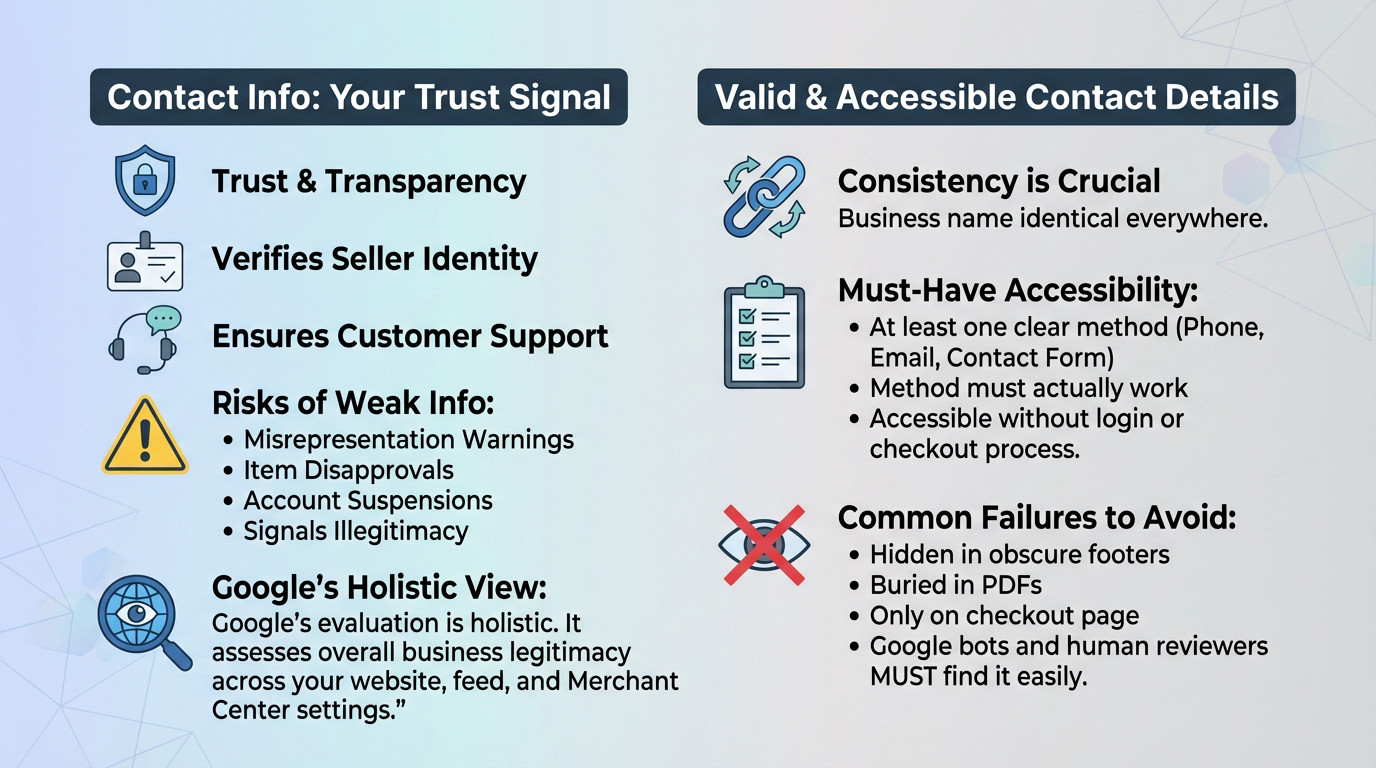
Meeting google merchant center contact information requirements isn’t marketing fluff. It is about trust and transparency. Google needs to know who is selling to its users and that customers have a way to get help.
If your details are weak or inconsistent, you are waving a massive red flag. This specific failure is a primary trigger for misrepresentation warnings, sudden item disapprovals, and those dreaded full account suspensions. It screams to Google that the business might not be legitimate.
Google’s evaluation is holistic. It doesn’t just look at one missing field; it assesses the overall picture of your business’s legitimacy across your website, feed, and Merchant Center settings.
What Google Actually Considers Valid and Accessible
Understand that “valid” means much more than just existing on a page. The information must be consistent and easy to find. This means your business name must be identical everywhere.
- At least one clear contact method (phone, email, or contact form).
- The contact method must actually work.
- Contact details must be accessible without a login or checkout process.
Here is where many merchants crash. Hiding contact info in obscure footers, burying it deep in a PDF, or only showing it on the checkout page is a direct violation. Google’s bots and human reviewers must find it easily.
Nailing the Details: Phone, Email, and Address
Now that you understand the ‘why’, let’s get into the specific google merchant center contact information requirements. This is where merchants often get tripped up.
Phone Number Requirements and Common Myths
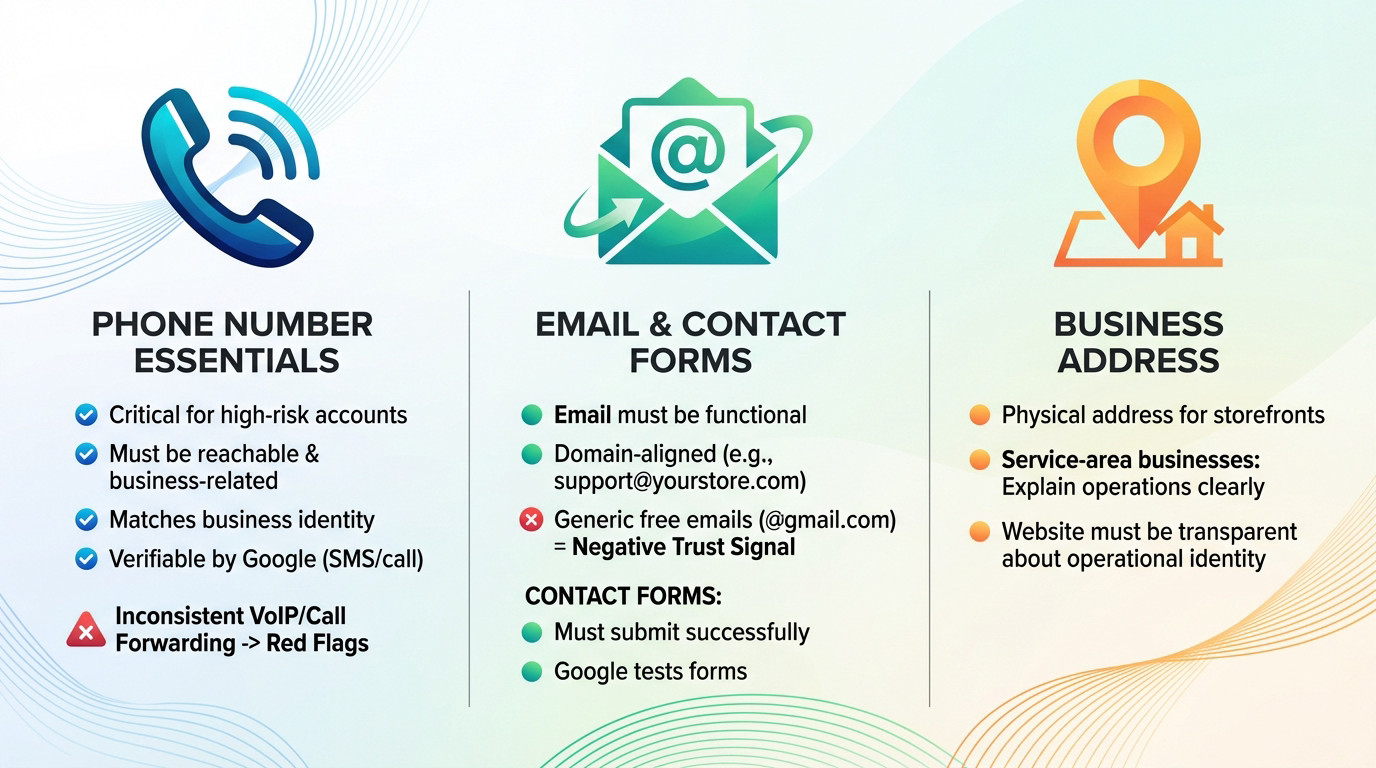
Stop assuming a phone number is just an optional field. While not mandatory for every single account, it becomes critical for higher-risk categories or accounts that have been flagged. Ignoring this is a fast track to suspension.
- Must be a reachable, business-related number.
- Must match the business identity.
- Must be verifiable by Google (via SMS/call).
Be very careful with VoIP or call-forwarding services. While not explicitly banned, they raise red flags if they are used to obfuscate the business’s true location or identity. When combined with other weak signals, this looks suspicious.
Email, Contact Forms, and Business Location
Your email address must be fully functional and monitored. Using a generic free provider like @gmail.com is a negative trust signal for a business. The email should always be domain-aligned (e.g., support@yourstore.com).
Contact forms are not a clever loophole to avoid listing details. They must submit successfully and not lead to a dead end. Google’s systems will test these forms to verify they actually work.
A physical address is required for businesses with a storefront. For service-area businesses, you must clearly explain how you operate. Distinguish this from hiding an address on a Google Business Profile, which is a separate issue. The website must be transparent about the business’s operational identity.
The Fast Track to Suspension: Common Mistakes and How Google Evaluates You
Mistakes That Scream ‘Misrepresentation’
Google doesn’t view these as minor typos. Ignoring specific google merchant center contact information requirements is seen as intentional misrepresentation.
If you want to trigger a red flag, just make these errors standard practice:
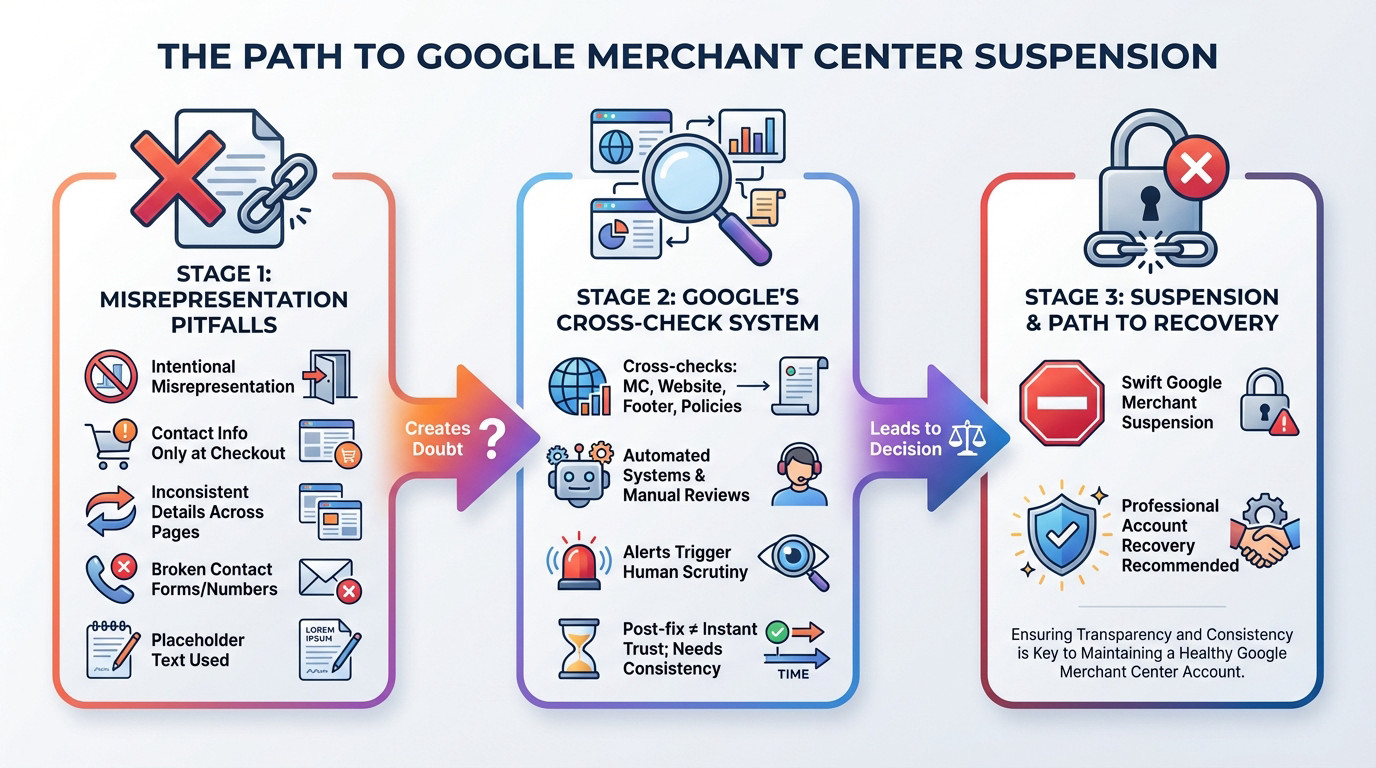
- Contact info only appears during checkout.
- Different business names or contact details across pages (e.g., header vs. policies page).
- Broken phone numbers or non-working contact forms.
- Using placeholder text like “123-456-7890” or “email@example.com”.
These inconsistencies create a trail of doubt. For Google, it suggests the merchant is either unprofessional or actively trying to hide their true identity, leading to a swift Google Merchant Center suspension.
How Google Connects the Dots Behind the Scenes
Google’s evaluation is not confined to one place. It cross-checks information between the “Business information” section in Merchant Center, your website’s contact page, the footer, and even your privacy policy and returns pages.
Both automated systems and manual reviews are utilized. An alert often triggers a human to look at your site, especially during an appeal process.
Fixing the contact info after a warning or suspension doesn’t instantly restore trust. You have to prove consistency. If you’re facing this, professional Google Merchant Center account recovery might be necessary.
Your Compliance Audit and Prevention Playbook
The Ultimate Contact Information Audit
Stop guessing. Open your Merchant Center account and website side-by-side. Use this checklist to spot gaps immediately. You must compare your setup against google merchant center contact information requirements to avoid silent suspension risks.
| Check Point | Pass/Fail Criteria |
|---|---|
| Contact Page Visibility | Criteria: Is there a dedicated ‘Contact Us’ page visible from the main navigation or footer? It cannot be hidden. |
| Phone Number Functionality | Criteria: Does the number work when called? Does it match the business identity and the number in GMC? |
| Email Responsiveness | Criteria: Does the email address receive messages? Is it a professional, domain-aligned address? |
| Address/Service Area Clarity | Criteria: Is the physical address or service area explanation clear and truthful on the website? |
| GMC Settings Match | Criteria: Do the business name, address, and phone in Merchant Center exactly match what’s on the website? |
| Site-Wide Consistency | Criteria: Is the contact information identical across all pages (header, footer, policy pages)? |
Building a Long-Term Prevention Strategy
Create a single source of truth for your data. Update this internal master document first when details change, then push updates to your public assets.
You need a strict change management process. If a phone number changes, verify the website, GMC, and policy pages immediately to ensure consistency.
Contact information is never just a design afterthought. It remains a foundational part of your online identity and credibility. Treat these details with respect.
Your contact information is the pulse of your store’s legitimacy, not just a data field. Don’t let a hidden address or mismatched phone number trigger a suspension. Audit your site today, ensure total consistency with Merchant Center, and prove to Google that you are a real, reachable business worth trusting.
FAQ
Why is Google so strict about contact information on my store?
It comes down to trust and user safety. Google isn’t just sending traffic to your site; they are vouching for you. If a customer buys something and can’t reach you for a return or a missing package, it reflects poorly on Google. They treat your contact details as a primary “trust signal” to verify that you are a legitimate business with a real human presence, not a fly-by-night scam.
Do I really need a phone number if I only offer email support?
Technically, you might get away with it in some low-risk categories, but I strongly advise against it. A verified phone number is one of the fastest ways to prove legitimacy to Google’s automated systems. Even if you prefer email support, having a working business number listed in your Merchant Center and on your website significantly lowers your risk of a “Misrepresentation” suspension.
Can I use a P.O. Box as my business address in Merchant Center?
No, you should avoid this. Google requires a physical operating address where your business is actually located. Using a P.O. Box or a virtual mail forwarding address often triggers red flags because it looks like you are trying to hide your true location. Transparency is non-negotiable here; your address on the website must match the physical reality of where you operate.
My contact info is on my site, so why did I get a Misrepresentation warning?
Presence isn’t the same as consistency. A common trigger is a data mismatch. For example, if your website footer lists one address but your Merchant Center account lists another (or a different variation of the same address), the bots flag it as suspicious. Ensure your business name, address, and phone number are identical across your website, your GMC settings, and your payment gateway.
Is it okay to put my contact details only on the checkout page?
Absolutely not. This is a direct violation of the “Editorial and Professional” requirements. Your contact information must be easily accessible before a customer initiates a purchase. Hiding it behind a checkout flow or a login screen frustrates users and signals to Google that you aren’t being transparent. Put it clearly in your footer or on a dedicated “Contact Us” page linked from the main navigation.