
The essential takeaway: Ignoring ‘minor’ warnings in Google Merchant Center is a strategic error that eventually leads to full account suspension, even if ads are currently running. Proactive daily monitoring remains the only reliable safeguard against sudden revenue loss. Treat every yellow warning icon as a future error waiting to kill your performance.
Ignoring your google merchant center alerts is a dangerous gamble that lets profitable products vanish from search results while you assume everything is running smoothly. This article explains exactly how to decode these signals so you can distinguish between harmless notifications and the critical errors that threaten your entire account. You will discover a simple monitoring workflow to catch these silent revenue killers before they permanently damage your performance.
- Decoding the Signals: What GMC Alerts Really Mean
- Separating the Signal from the Noise: The Alerts That Matter Most
- The Escalation Ladder: How Small Warnings Turn Into Account Suspensions
- Building Your Fire Alarm System: A Practical Monitoring Workflow
Decoding the Signals: What GMC Alerts Really Mean
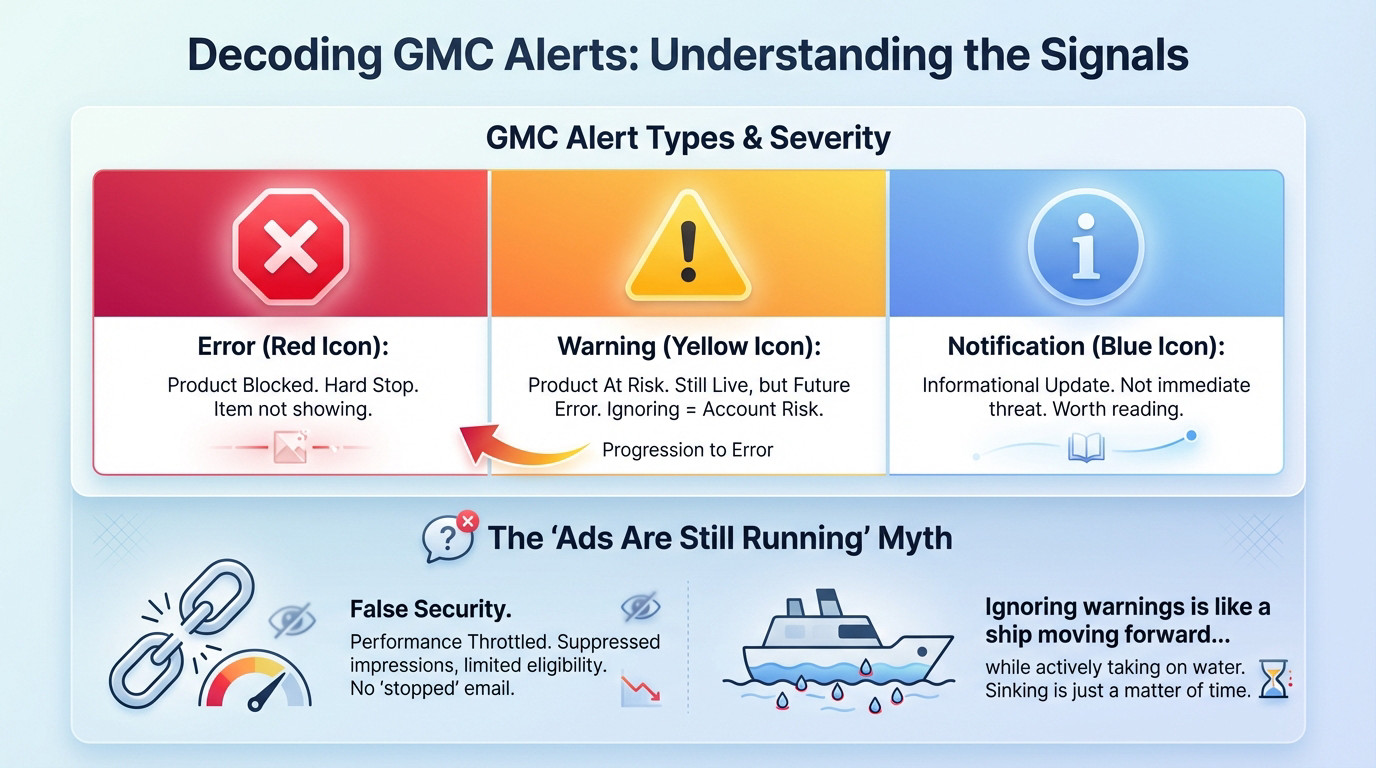
Errors vs. Warnings: Not the Same Fight
An Error (red icon) isn’t a suggestion; it is a hard stop that kills product visibility immediately. A Warning (yellow icon) implies your item is technically live but actively bleeding trust.
Treat warnings as future errors waiting to hatch. Ignoring these yellow flags is like driving with a check engine light on; you’re failing Google’s attentiveness test. Unresolved warnings pile up, signaling a neglected account and spiking your risk profile.
Finally, “Notifications” (blue icon) are informational updates. They aren’t immediate threats, but read them anyway.
The “My Ads Are Still Running” Myth
Many merchants believe that if ads are spending money, the account is healthy. This is a dangerous hallucination. Google merchant center alerts often fire long before the cash register stops ringing.
Performance gets throttled silently before a full stop occurs. Google suppresses impressions or limits ad format eligibility, meaning you lose market share without ever receiving a “suspension” email.
Seeing your ads run while ignoring item-level warnings is like celebrating that the ship is still moving forward… while it’s actively taking on water. The sinking is just a matter of time.
Separating the Signal from the Noise: The Alerts That Matter Most
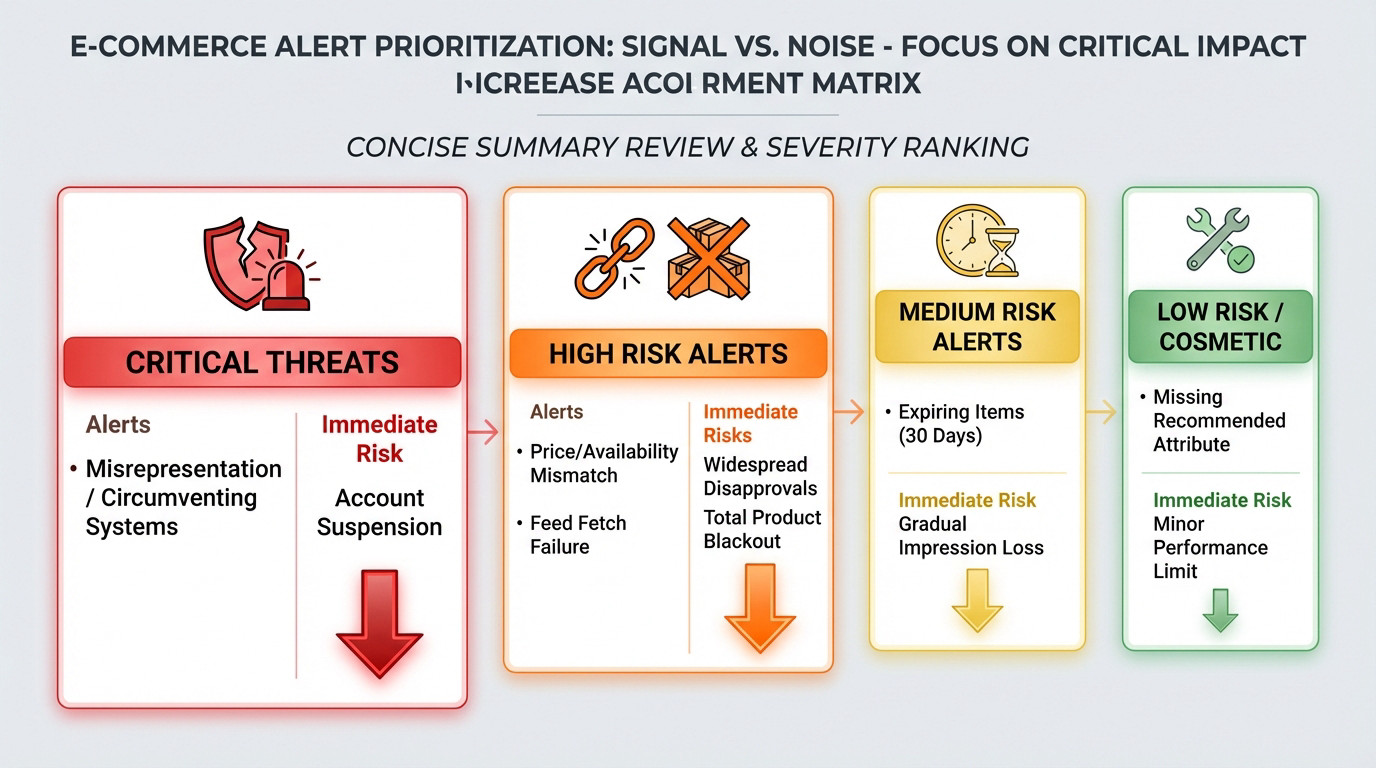
You see notifications piling up, but not all google merchant center alerts are equal. Some are just background static; others are existential threats to your revenue.
Existential Threats vs. Cosmetic Fixes
Let’s be real about “cosmetic” alerts. Missing a recommended attribute like color is annoying, but it won’t kill your account. The real danger hides in policy and trust-based warnings.
You need to triage these immediately. Use this simple matrix to decide what to panic about and what to fix later.
| Alert Type | Severity | Common Location | Immediate Risk |
|---|---|---|---|
| Misrepresentation | CRITICAL | Account Issues | Account Suspension |
| Price/Availability Mismatch | High | Item Issues | Widespread Disapprovals |
| Feed Fetch Failure | High | Feed Processing | Total Product Blackout |
| Expiring Items | Medium | Item Issues | Gradual Impression Loss |
| Missing Recommended Attribute | Low | Item Issues | Minor Performance Limit |
Your Account’s Ticking Time Bombs
These are the top-tier threats. If you see “misrepresentation” or “circumventing systems”, stop everything. Google isn’t flagging a data error here; they are questioning your business’s trustworthiness.
Widespread price and availability mismatches are just as dangerous. If your feed price doesn’t match your site, Google sees it as misleading users. That friction destroys performance.
Finally, watch for the silent killer. As support specialists warn, offers expire after 30 days if you don’t refresh the feed. Your active inventory simply bleeds out unnoticed.
The Escalation Ladder: How Small Warnings Turn Into Account Suspensions
The Compounding Effect of Neglect
It begins quietly with ignored google merchant center alerts on your dashboard. You assume it’s a glitch and decide to skip it. That is your first mistake.
Soon, more products get flagged with the same data error, and Google throttles impressions for those SKUs. Suddenly, those yellow warnings turn into mass disapprovals across the board. The issue isn’t isolated anymore; it is now systemic.
The final step? A full account-level enforcement action. Suspension.
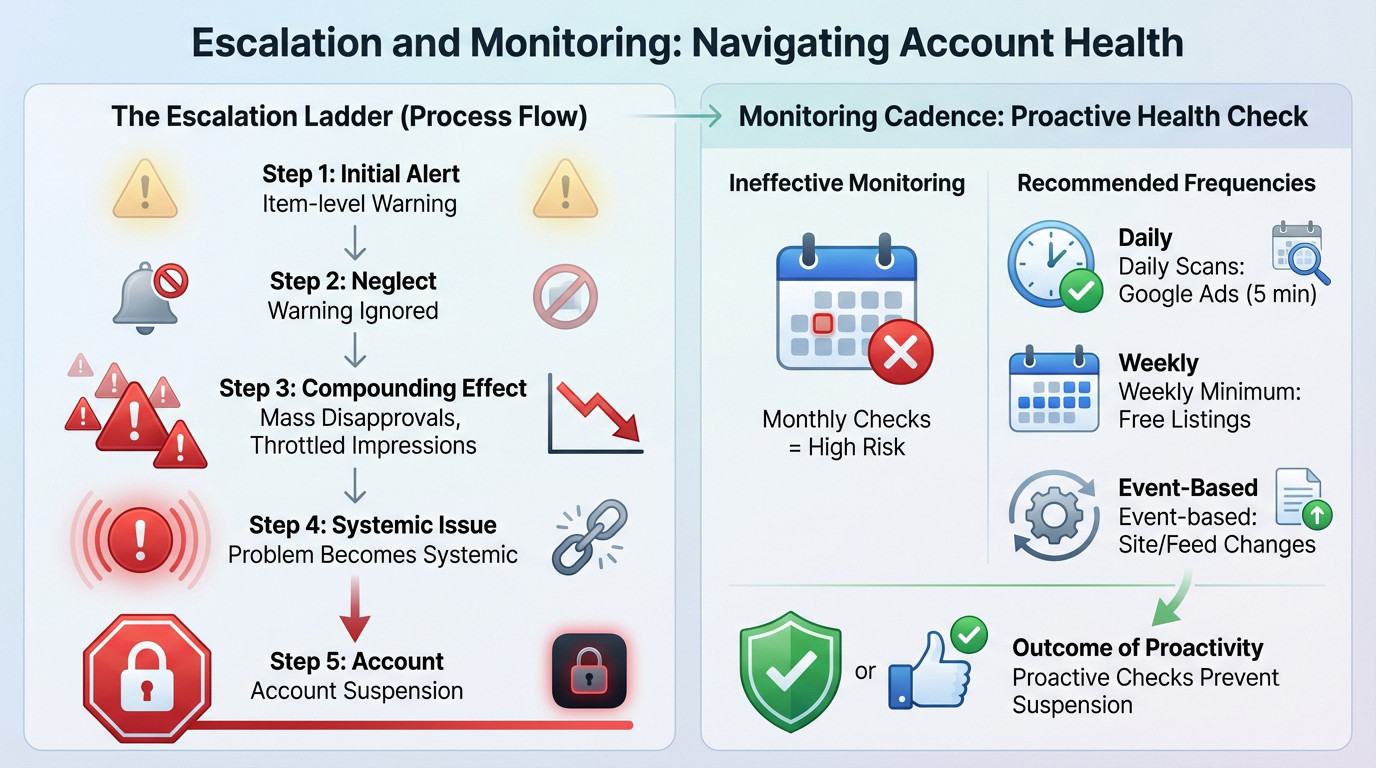
Your Monitoring Cadence: Why Monthly Checks Are a Liability
A monthly check-in on Merchant Center isn’t a monitoring process; it’s an admission that you’re willing to let your account burn for 29 days before calling the fire department.
- Daily scans: For any account actively running Google Ads. A 5-minute check is non-negotiable.
- Weekly minimum: For accounts using only free listings.
- Event-based checks: Always check before and after any site change, price update, or feed modification.
If you find yourself in a situation where a suspension has already occurred, the focus shifts from monitoring to a full-blown Google Merchant Center account recovery effort. Proactive checks prevent this fire drill.
Building Your Fire Alarm System: A Practical Monitoring Workflow
So, you’re convinced. You need to check often. But what does a professional, non-amateurish check actually look like?
The Daily Quick-Scan Checklist
A daily scan shouldn’t take hours to complete. It is about targeted checks, not boiling the ocean every morning.
- Check the Account Issues tab first; any red flags here trump everything else.
- Scan the Item Issues tab and sort by “Affected items” to see the biggest problems.
- Review the Feed Processing tab for the latest upload to catch failures early.
- Note any significant drop in “Active” products on the overview page immediately.
Relying only on email notifications is amateur hour. You must go inside the platform where the real data lives to manage your google merchant center alerts effectively.
From Symptom to Root Cause
Google’s alert descriptions are often intentionally vague. “Invalid value” doesn’t tell you why it is invalid. Your job is to be a detective. You must dig deeper to find the actual error source.
Map the alert to the specific product in your feed first. Then cross-reference the data with your live landing page and Google’s policy pages. Is it a currency symbol? Is it a schema markup issue? Is it a feed rule error?
Manually fixing one item is pointless if the root cause is a systemic feed problem. You’re just playing whack-a-mole instead of avoiding a painful Google Ads account reinstatement. For complex setups, use automated scripts to monitor disapprovals.
Stop treating Merchant Center like a set-it-and-forget-it tool. The difference between a thriving account and a suspended one is often just attention to detail. Commit to the daily scan. Fixing a warning today is infinitely cheaper than hiring a recovery expert tomorrow.
FAQ
How often should I actually check Google Merchant Center?
If you are actively spending money on Google Ads, a daily check is non-negotiable. It only takes five minutes to scan for critical errors that could kill your ROAS. If you rely solely on free listings, a weekly review is the absolute minimum, but leaving it any longer is simply gambling with your account’s health.
What is the difference between a red error and a yellow warning?
A red error is a hard stop; the affected product is disapproved and is not showing to customers at all. A yellow warning means the product is still live, but its performance may be limited, or it is at risk of future disapproval. Treat yellow warnings as “pre-errors”—if you ignore them, they will eventually escalate into suspensions.
My ads are still running despite the warnings, so can I ignore them?
Absolutely not. Just because your ads are running doesn’t mean they are performing at full capacity. Google often throttles impressions or limits ad formats for accounts with unresolved warnings long before a full suspension hits. Ignoring these signals is like driving a car with the engine light on; you might be moving now, but a breakdown is inevitable.
Which alerts are the most dangerous for my account?
The most critical alerts are those related to “Misrepresentation,” “Circumventing Systems,” or widespread price and availability mismatches. These aren’t simple data typos; they are trust violations. If Google flags these, they are questioning the legitimacy of your business, and immediate action is required to avoid a total account suspension.
Why do my products disappear after 30 days?
Google enforces a strict expiration policy to ensure data freshness. If you do not re-upload or refresh your product feed within a 30-day window, your items will automatically expire and vanish from search results. You cannot simply “set and forget” a feed; you must have a scheduled fetch or automated upload in place to keep your inventory active.