
The bottom line: Soft suspensions keep a profile visible but unmanageable due to trust issues, while hard suspensions completely erase the business from Maps for serious violations. Distinguishing between these states via a simple visibility check is critical to avoid panic-editing and select the correct recovery path, whether that means simple re-verification or a complex, evidence-heavy formal appeal.
Waking up to a vanished listing is a terrifying revenue killer, but blindly fighting Google’s algorithm without a plan will only dig a deeper hole for your business.
You need to immediately determine if you are dealing with a soft vs hard Google Business Profile suspension, as misdiagnosing the problem is the most common reason owners fail to recover their rankings. We are going to bypass the vague support emails and give you a concrete, step-by-step battle plan to diagnose the issue and restore your visibility.
- Soft vs Hard Suspension: What These Industry-Terms Really Mean
- The Definitive Comparison: Soft vs. Hard Suspension
- How to Diagnose Your Suspension in 5 Minutes
- The Clean-Fix Path for a Soft Suspension
- The Hard Suspension: Reinstatement Battle Plan
- Critical Mistakes That Turn a Problem Into a Disaster
- The Escalation Risk: When a Soft Suspension Turns Hard
Soft vs Hard Suspension: What These Industry-Terms Really Mean
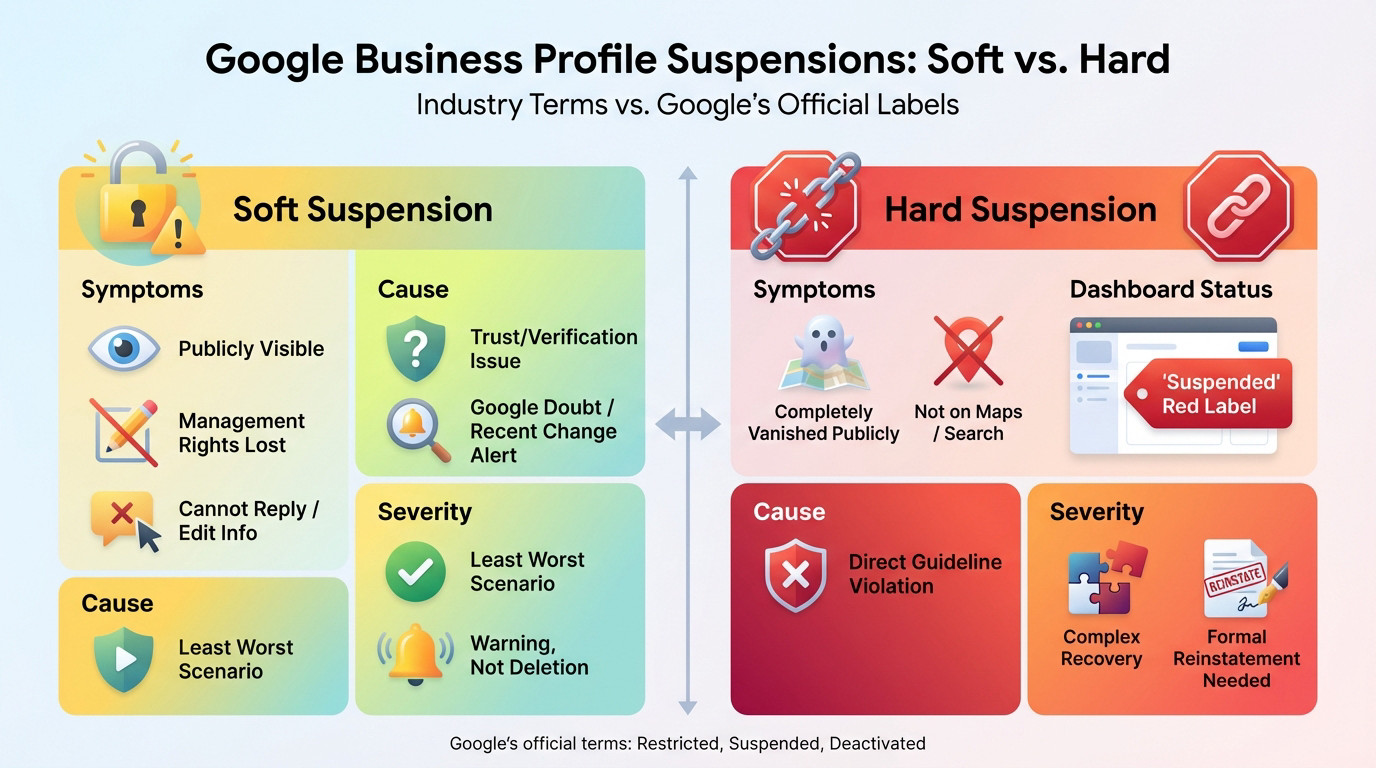
Let’s Get This Straight: Google Doesn’t Use These Labels
You won’t find “soft” or “hard” in the official manual. Local SEO pros coined these terms. Google simply flags profiles as restricted, suspended, or disabled. Let’s clear this up immediately.
Why do we use them? Because they describe two radically different realities. One leaves you limping; the other kills your visibility dead. Grasping this distinction is your first move to fix the mess without losing your mind.
This guide decodes the soft vs hard Google Business Profile suspension difference and how you fight back.
What a Soft Suspension Actually Feels Like
Here is the telltale sign: your listing remains visible publicly on Maps and Search. But you are locked out. You cannot reply to reviews, update hours, or touch your business info.
Usually, this signals a trust or verification glitch. Google doubts your account quality, your ownership claim, or a specific edit you just made raised a red flag in their system.
Look, this is the “better” bad news. It acts as a stern warning rather than a total deletion of your digital existence.
The Hard Suspension: When Your Profile Vanishes
This is the nightmare scenario. Your listing has completely disappeared. Potential clients cannot find you on Google Maps or local search results. It is as if your business never existed online.
Inside your dashboard, the ghost remains. You see the listing, but it carries that dreaded red “Suspended” tag. This is a direct penalty for a serious violation of guidelines.
Getting back online is tougher here. You need a strict, formal reinstatement procedure to survive.
The Definitive Comparison: Soft vs. Hard Suspension
Now that the definitions are clear, let’s put them side-by-side. The difference is striking when you look at the details of a soft vs hard Google Business Profile suspension.
Side-by-Side Breakdown
This chart summarizes the key differences for a quick diagnosis. It cuts through the noise so you can identify your status immediately.
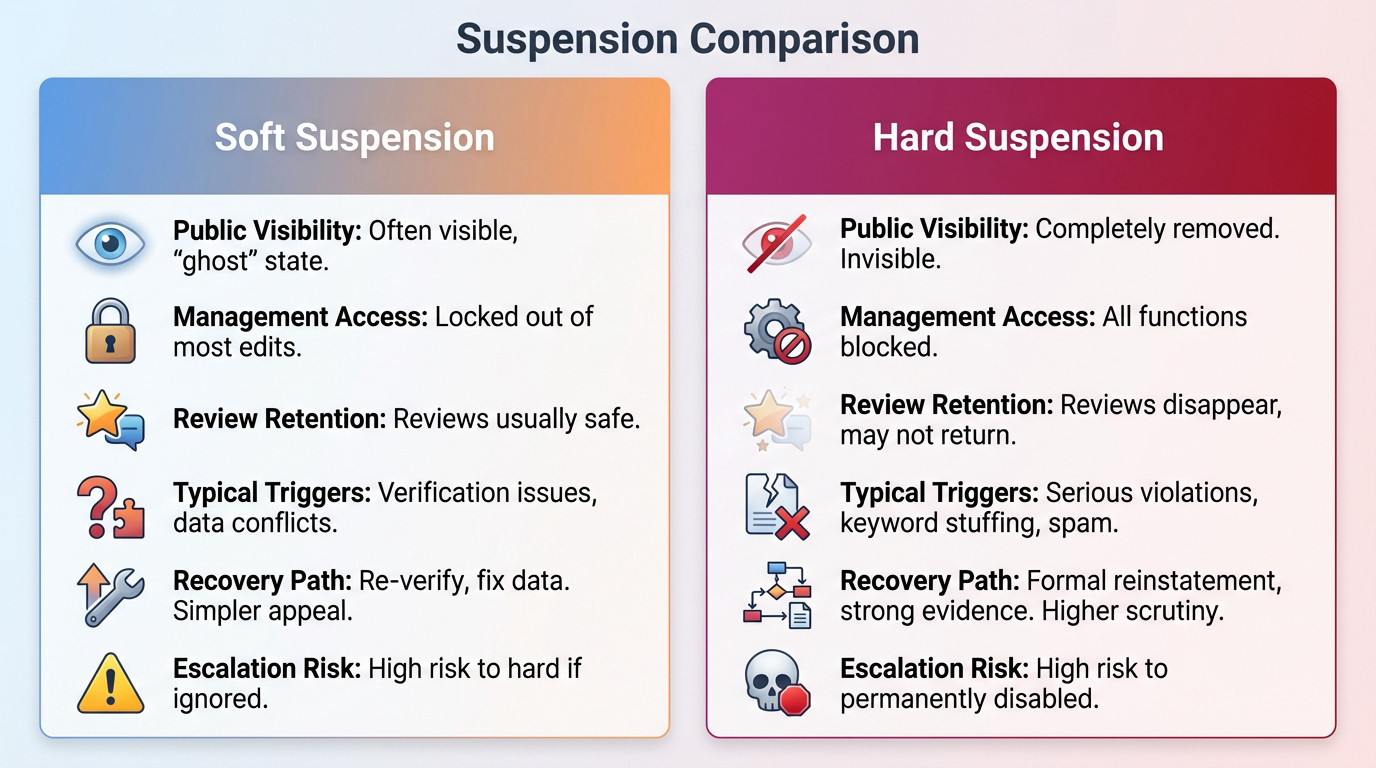
| Feature | Soft Suspension | Hard Suspension |
|---|---|---|
| Public Visibility | Often still visible to the public, but may not appear for all searches. You’re in a ‘ghost’ state. | Completely removed from Google Search and Maps. Invisible to customers. |
| Management Access | You are locked out of most edits. You can’t update hours, reply to reviews, or post updates. | You can see the ‘Suspended’ status in your dashboard, but all management functions are blocked. |
| Review Retention | Existing reviews are usually safe and remain visible. | Reviews disappear with the listing. They may or may not return upon reinstatement. |
| Typical Triggers | Verification issues, user/ownership changes, conflicting business information (citations vs. GBP). | Serious guideline violations: keyword stuffing, ineligible address, spammy tactics, duplicate listings. |
| Recovery Path | Often resolved by re-verifying the business or fixing the data conflict. Appeal is simpler. | Requires a formal reinstatement request with strong evidence. Much higher scrutiny. |
| Escalation Risk | High risk of becoming a hard suspension if you ignore it or make repeated incorrect edits. | High risk of becoming a permanently disabled profile if the appeal is handled poorly or violations are repeated. |
Take a hard look at the visibility row. That is the decisive test: if customers cannot see you, it is a hard suspension.
Recovery complexity is the other major factor. This is why you need a completely different approach for each scenario.
How to Diagnose Your Suspension in 5 Minutes
The table gave you an idea. Now, let’s act. Here is a simple 4-step test to confirm your diagnosis.
Your Step-by-Step Diagnostic Checklist
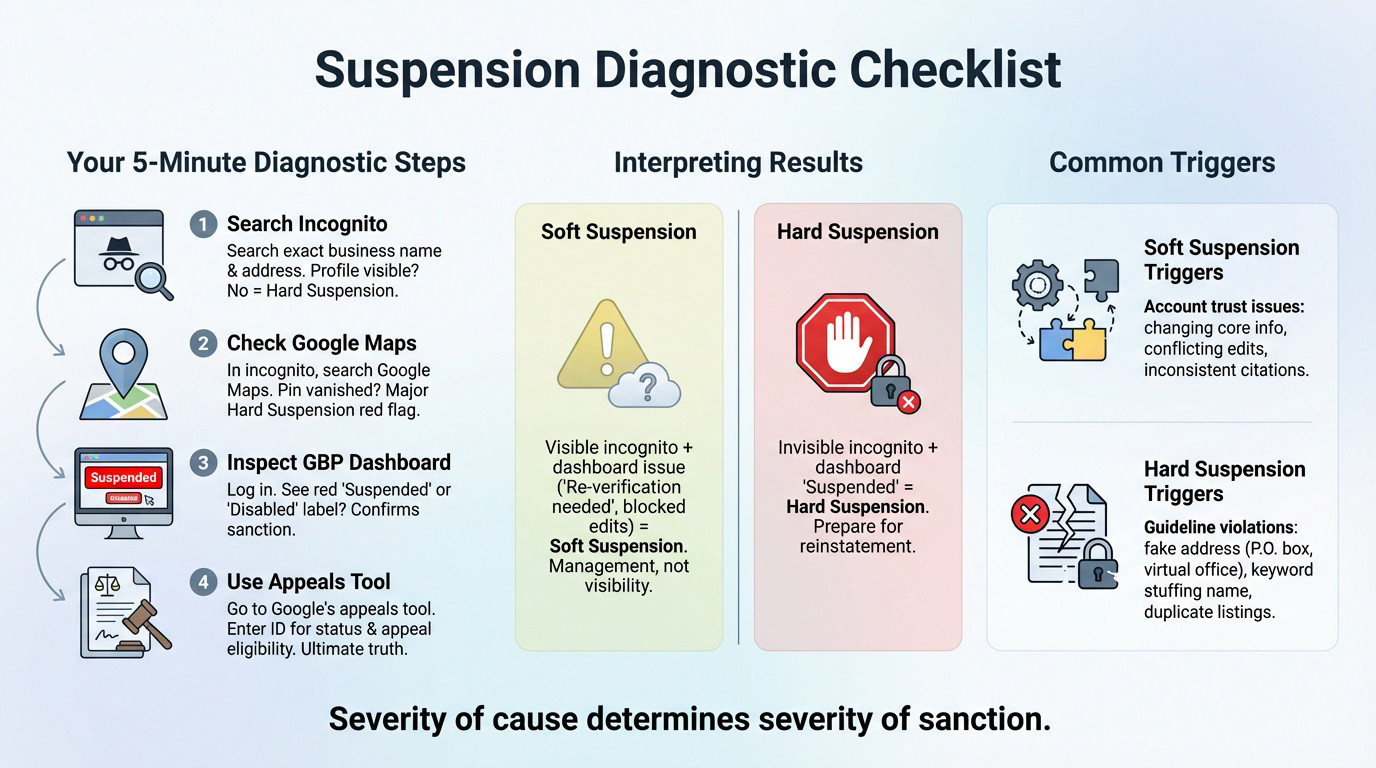
Stop guessing. These steps take minutes and provide the definitive answer you need right now.
- Search Incognito: Open a private browser window. Search for your exact business name and address. If you don’t appear, it suggests a hard suspension.
- Check the Map: Search your business on Google Maps in incognito. Is the pin missing? If yes, that is a major red flag for a hard suspension.
- Inspect Your Dashboard: Log into your profile manager. A red ‘Suspended’ or ‘Disabled’ label confirms a sanction is active.
- Use the Appeals Tool: Enter your profile ID in Google’s official appeals tool. It reveals your exact status and eligibility. This is the ultimate source of truth.
Interpreting the Results
Analyze your findings. If your listing is visible in incognito but the dashboard demands “Re-verification,” you have a soft suspension. It is a management lock, not a visibility death sentence.
Conversely, if you are invisible in incognito and the dashboard says “Suspended,” there is no doubt. You face a hard suspension and must prepare a reinstatement package. This defines the soft vs hard Google Business Profile suspension reality.
Common Triggers for Each Suspension Type
Suspensions aren’t random; they trigger from specific actions. Identifying the cause is key to the fix.
- Soft Suspension Triggers: Usually account trust issues: changing core info (name, address), conflicting user edits, or inconsistent citations across the web.
- Hard Suspension Triggers: Tied to guideline violations: using fake addresses (P.O. boxes), keyword stuffing your name (‘NYC Best Plumber’), or creating duplicates.
The severity of the trigger dictates the punishment. You must identify yours.
The Clean-Fix Path for a Soft Suspension
So, you have diagnosed a soft suspension. Freeze. Do not touch a single field yet. You need a methodical process to regain control without triggering a full-blown hard suspension.
First Rule: Stop All Edits
Frantically changing your business name or categories sends panic signals to Google. The algorithm views rapid-fire edits as an attempt to game the system. Every new save just increases the machine’s suspicion. You are literally digging a deeper hole.
The smartest move right now is to pause. Step back and analyze the data before acting. It feels counter-intuitive to sit on your hands, but it is the only correct approach.
Audit Your Core Information and Users
Verify that your name, address, and phone number (NAP) on the profile match your official tax documents and website exactly. Even a minor abbreviation mismatch can trigger these filters. Inconsistency is the silent killer here.
Next, look at who holds the keys. Do ex-employees or old agencies still have access? Delete all suspicious users or inactive accounts immediately. Clean the list.
Finally, ensure the Primary Owner account is active, secure, and free of other penalties.
The Re-verification and Appeal Process
If Google simply prompts you to re-verify your profile, do it immediately. This is often the quickest escape route. Prepare for a video call or a postcard.
If re-verification isn’t an option and the restricted status sticks, use the official appeals tool. State clearly that you have audited your data. Explain the specific checks you performed to ensure compliance with guidelines.
Remember, the difference between a soft vs hard Google Business Profile suspension is often just recovery speed. You are proving legitimacy here, not fighting a crime.
The Hard Suspension: Reinstatement Battle Plan
Identify and Fix the Root Cause First
Rushing the appeal before fixing the mess is a guaranteed failure. In the high-stakes context of a soft vs hard Google Business Profile suspension, Google won’t reinstate a profile that still breaks rules. You must play detective.
Look at the usual suspects for a hard suspension. Is your business name stuffed with keywords? Is your address actually a P.O. Box? Do you have a duplicate listing floating around?
Fix the profile. Revert your business name to exactly what appears on your license. Delete those duplicate listings immediately. You have to be ruthless here.
Gather Your Proof: Building an Undeniable Case
You need tangible evidence that matches your corrected profile details exactly. This isn’t just paperwork; it is the absolute heart of your appeal strategy.
Get solid proof: a business license showing the name and address, or a utility bill like electricity or internet. For storefronts, photos of permanent signage are gold. Service businesses need photos of branded vehicles.
Your evidence must be undeniable proof that you are a real, legitimate business operating at the location and under the name listed on your profile. No mismatches allowed.
Warning: never forge documents. Google’s teams are trained to spot fraud instantly, and that leads to a permanent disablement.
Submitting the Reinstatement Request
Once the profile is clean and proofs are gathered, go to the appeals tool. Submit your request exactly one time.
Be concise and factual in the form. Admit the violation you likely committed, confirm you fixed it, and attach your evidence. Avoid long emotional speeches; they don’t help.
After submitting, be patient. Bombarding support just clogs the system. If you need expert backup, a Google Business Profile reinstatement service becomes relevant here.
Critical Mistakes That Turn a Problem Into a Disaster
The road to recovery is paved with pitfalls. Many business owners, in a panic, make mistakes that worsen their case. Avoid them at all costs.
The ‘Panic Editing’ Spiral
You see the suspension tag and start changing everything. Changing your name, then the category, and finally the address within hours is a huge red flag for Google. It looks like you are hunting for a loophole. Stop touching it.
Every single edit can reset your place in the review queue or trigger fresh automated checks. You effectively lock yourself into a suspension loop. You are making the machine suspicious again.
Creating a Duplicate Listing: The Worst Workaround
You might think, “My listing is suspended, I’ll just make a fresh one.” That is a catastrophic error. You are digging a deeper hole for your business visibility.
Google hates duplicates and their systems are built to hunt them down. Creating a second profile while the original sits suspended is seen as a bypass attempt. They treat this as aggressive spam behavior. It destroys your credibility.
Creating a new profile is the fastest way to get both your old and new listings flagged, and can escalate a simple suspension into a permanent ban on your account.
Submitting Weak Appeals and False Evidence
Sending an appeal that just says “Please reinstate my listing, I don’t know what happened” is useless. It shows zero understanding of the issue. You are wasting your one shot.
Submitting evidence that doesn’t match—like a utility bill with a slightly different business name—is just as bad. This erodes trust immediately. It suggests you aren’t rigorous. Or worse, it looks like you are trying to trick the system.
Your goal is to make the examiner’s decision easy with clear, consistent proof. For more details, check our Google Business Profile suspension FAQ.
The Escalation Risk: When a Soft Suspension Turns Hard
Never underestimate a soft suspension. Treating it like a simple bug is a mistake. It’s a warning shot that, if mishandled, can quickly spiral into your profile vanishing completely.
How Trust Erodes with Google
Think of your profile as having an invisible trust score. A soft suspension signals that this metric has taken a hit. Panic-editing core details or failing a re-verification check doesn’t just annoy the algorithm; it tanks your credibility further.
Once that internal trust signal dips below a specific safety threshold, Google’s automated systems stop being polite. They shift the penalty from a warning to a full-blown removal.
That’s when your dashboard warning mutates into a hard suspension, stripping your business from Maps entirely.
Repeated Violations and Unresolved Issues
If the root cause of your soft suspension is a data mismatch and you ignore it, you are playing with fire. Google eventually interprets this lingering inconsistency not as a mistake, but as a deliberate attempt to deceive users.
For instance, if your website lists one address but your GBP shows another, ignoring the restriction forces Google to conclude your listing is ineligible. That is exactly where the soft vs hard Google Business Profile suspension dynamic turns fatal.
The Path to a Disabled Profile
This is the nightmare scenario. A “disabled” profile sits a tier above a hard suspension. It is Google’s final sanction, effectively nuking your digital existence.
This usually happens after repeated and serious violations, or after you have botched multiple recovery attempts. It is the direct consequence of refusing to take the initial soft and hard warnings seriously.
Understanding the difference between a suspended vs disabled Google Business Profile is vital to grasp the stakes involved.
Whether you’re dealing with a frustrating soft lockout or a terrifying hard suspension, the rule remains the same: don’t panic. Stop editing, diagnose the root cause, and build a solid case before appealing. If the process feels overwhelming or you can’t afford to lose more revenue, reach out to our team for expert reinstatement help today.
FAQ
What is the actual difference between a soft and hard suspension?
It comes down to public visibility. With a soft suspension, your business usually stays visible on Google Maps and Search, but you lose the ability to manage it—you are essentially locked out of the dashboard. It is often a verification issue.
A hard suspension is far more severe. Google completely removes your listing from public view, making your business invisible to customers. This is a direct sanction for a guideline violation and requires a formal reinstatement process to fix.
How can I quickly tell which type of suspension I have?
The quickest test is a Google Search in Incognito mode. Search for your exact business name and city. If your listing appears on the map but you cannot access the backend to make edits, you are looking at a soft suspension.
If the listing has vanished entirely from Maps and Search results—as if your business never existed—you are dealing with a hard suspension. You will also likely see a red “Suspended” or “Disabled” notice in your dashboard.
Should I create a new profile while I wait for reinstatement?
Absolutely not. Creating a new profile to bypass a suspension is one of the worst mistakes you can make. Google’s algorithms will flag this as a duplicate listing or an attempt to circumvent their guidelines.
This “workaround” often escalates a fixable issue into a permanent ban on your Google account. You must focus on fixing and reinstating the original profile, not cloning it.
What specific actions typically trigger a hard suspension?
Hard suspensions are almost always triggered by core guideline violations that Google views as deceptive. The most common culprits are keyword stuffing in your business name (e.g., “Emergency Plumber London” instead of just “Smith Plumbing”) or using a P.O. box or virtual office as a physical address.
Other major triggers include lead generation spam (creating listings for a business that doesn’t exist) or having multiple listings for the exact same business location.
How long does the reinstatement process usually take?
It varies significantly by the type of suspension. Soft suspensions can often be resolved in a few days simply by re-verifying your account or removing an unauthorised user.
Hard suspensions are a battle. They require a manual review by Google’s support team. Once you submit your reinstatement request with evidence, it typically takes anywhere from two to six weeks to get a resolution, depending on their current backlog.