
The bottom line: A suspended Google Business Profile is temporarily hidden and recoverable, whereas a disabled listing is effectively evicted from Google’s systems. Identifying the correct status is vital to avoid wasting weeks on impossible appeals. Most importantly, a suspension keeps your hard-earned reviews intact, while a disabled status erases them permanently.
Waking up to find your hard-earned business listing vanished from Google Maps is a nightmare scenario that instantly kills your local leads. Panic is a natural reaction, but knowing the specific technical difference between a suspended vs disabled Google Business Profile is the only way to stop the financial bleeding and avoid making fatal appeal mistakes.
We will cut through the vague support emails to show you exactly how to diagnose your status and the precise steps required to recover your presence before your competitors permanently steal your customers.
- Suspended vs Disabled: Why the Difference Is Everything
- Diagnosing Your Problem: The Signs and Causes
- Your Action Plan: What to Do Next (and What to Avoid)
- The Road to Recovery: Appeals, Evidence, and When to Call for Help
Suspended vs Disabled: Why the Difference Is Everything
What a Suspended Google Business Profile Actually Means
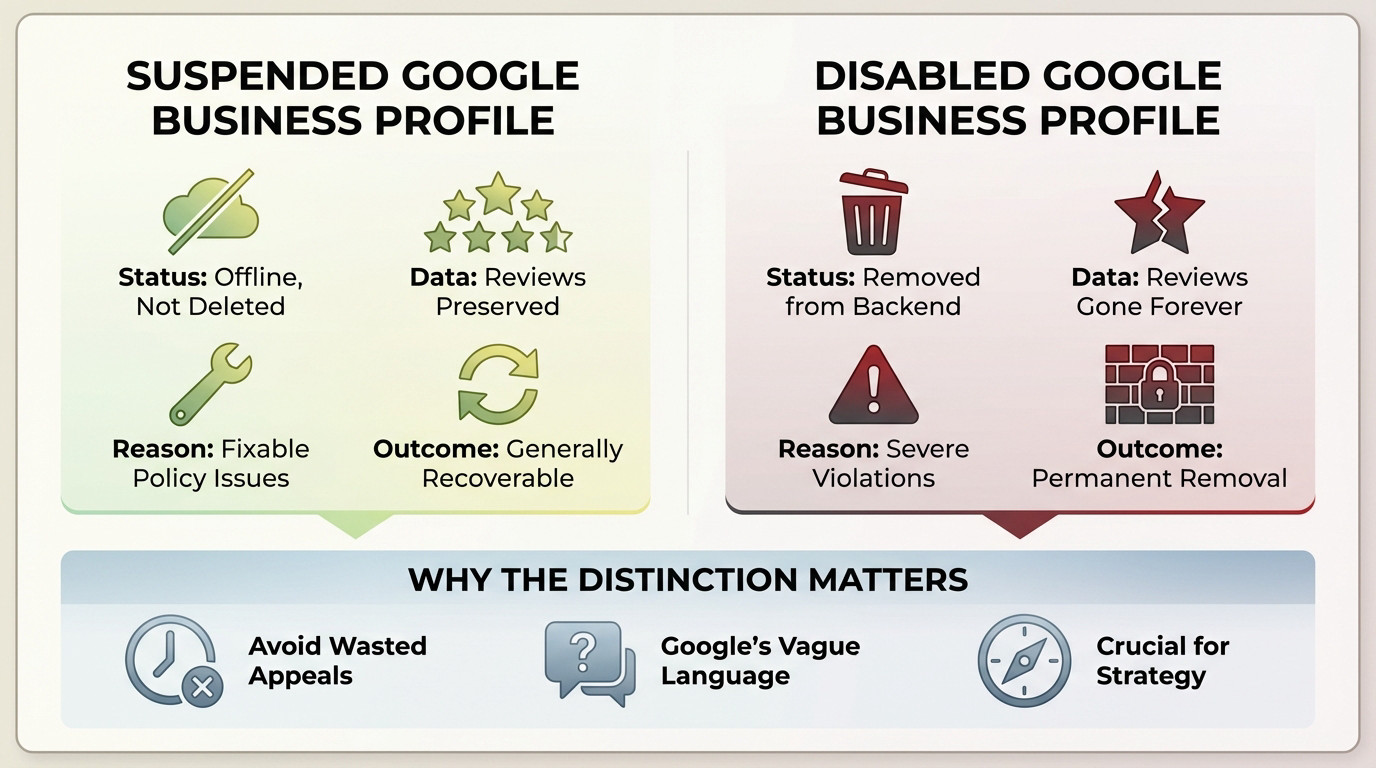
When looking at a suspended vs disabled Google Business Profile, understand that a suspension isn’t a deletion. It is just offline. It is still in your account, but invisible on Search and Maps. Think of it as a penalty box.
The good news is that your data, especially your hard-earned reviews, are preserved. If reinstated, they come back. This is a temporary enforcement action, usually for fixable issues.
Suspensions come in two flavors: “soft” (visible but unmanageable) and “hard” (completely gone). Both are generally recoverable.
What a Disabled Google Business Profile Really Signals
A disabled profile is a different beast entirely. This is not a penalty box; it is an eviction. Google has decided the profile should not exist and removed it from their backend systems.
This is tied to severe violations like fake businesses or circumventing policies. In most cases, it is a permanent removal. Your reviews are gone for good. There is usually no coming back.
Trying to create a new profile for the same business can trigger an immediate re-disabling because Google has lost trust.
Why This Distinction Will Save You Time and Grief
Confusing the two is the biggest mistake you can make. Treating a disabled profile like a simple suspension wastes weeks on appeals doomed to fail.
Google’s vague language is the problem. They use “suspended” and “disabled” almost interchangeably in emails, but the consequences are night and day. Understanding which you have is step one.
Diagnosing Your Problem: The Signs and Causes
So, how do you figure out which situation you’re in? It comes down to looking at the clues Google gives you.
How to Tell Which One You’re Dealing With
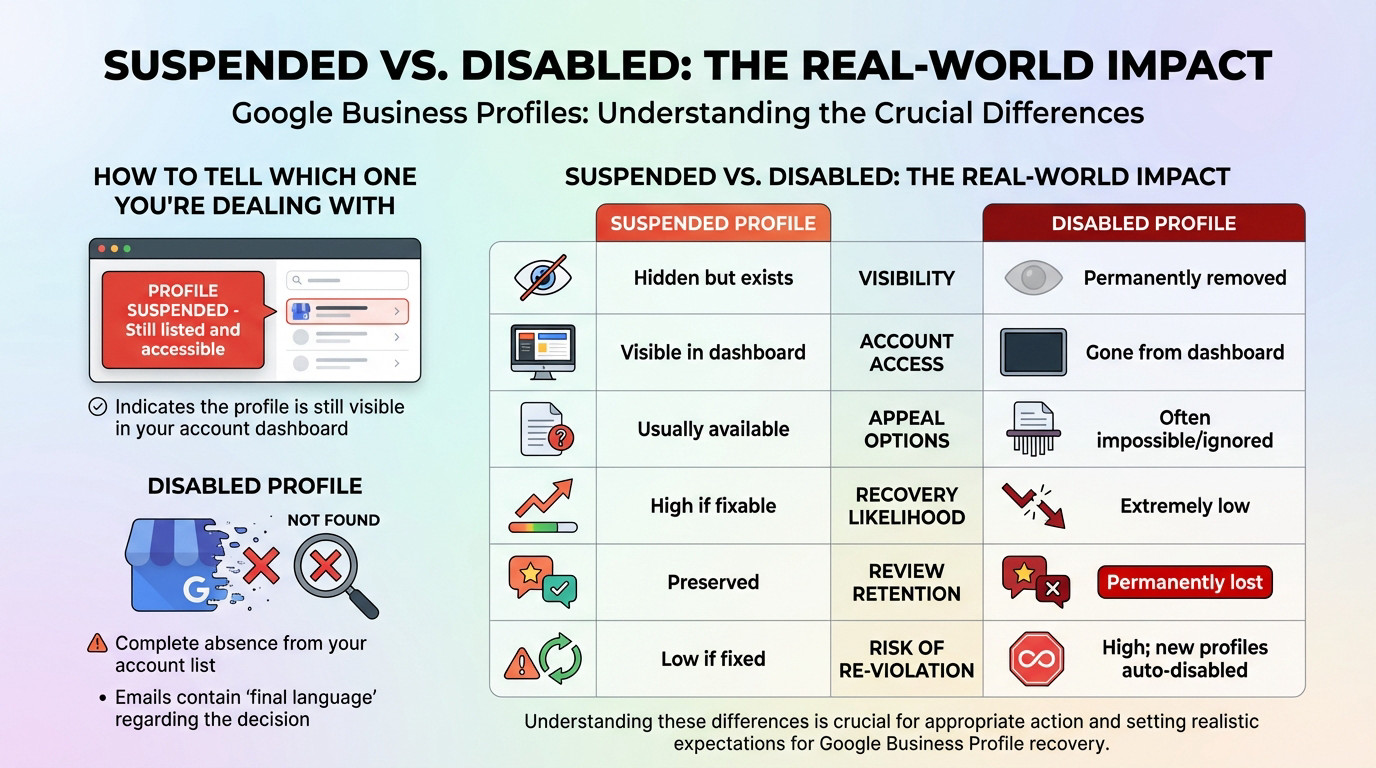
Check your GBP dashboard. If the profile is still listed, even with a red “Suspended” notice, you’re likely dealing with a suspension. You can still access some parts of it.
If the profile has vanished entirely from your account list, it’s likely disabled. The emails from Google might also use more final language, and the reinstatement tool might not even find your profile to appeal.
Key Differences at a Glance
Let’s break this down clearly. The implications for your business are completely different depending on the status.
| Feature | Suspended Profile | Disabled Profile |
|---|---|---|
| Visibility | Hidden from public view, but exists. | Permanently removed from Google. |
| Account Access | Profile is visible in your dashboard. | Profile is gone from your dashboard. |
| Appeal Options | Reinstatement form is usually available. | Appeal is often impossible or ignored. |
| Recovery Likelihood | High for legitimate businesses that fix the issue. | Extremely low. |
| Review Retention | Reviews are preserved and return upon reinstatement. | Reviews are permanently lost. |
| Risk of Re-Violation | Low if the root cause is fixed. | High; new profiles for the same business are often auto-disabled. |
Your Action Plan: What to Do Next (and What to Avoid)
Okay, you’ve diagnosed the problem. Now what? Your next steps are completely different depending on the suspended vs disabled Google Business Profile scenario you are facing.
The Playbook for a Suspended Profile
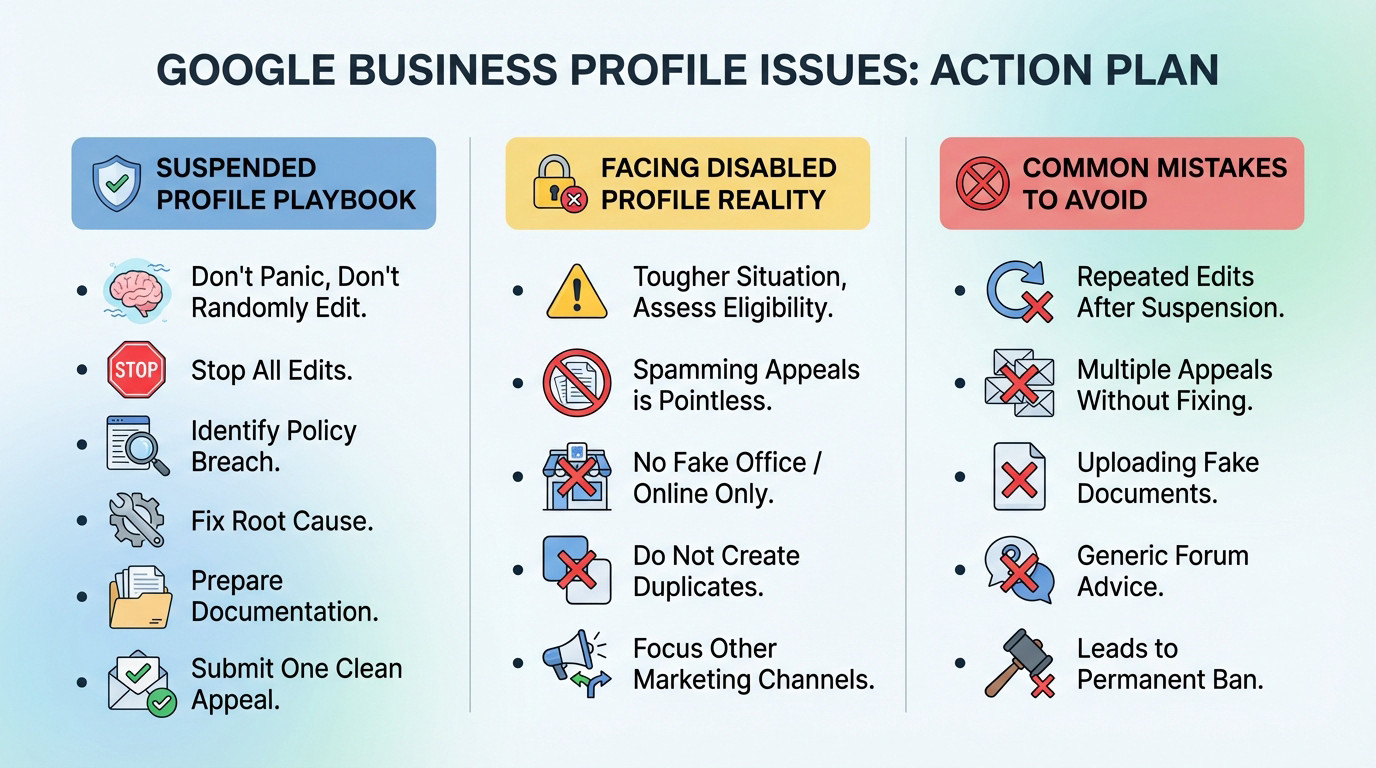
If your profile is suspended, take a breath. Don’t panic and start making random changes. This is a solvable problem if you’re a legitimate business.
- Stop all edits. Don’t touch anything in the profile until you know the cause.
- Identify the policy breach. Was it your business name? Address? Service area? Be brutally honest.
- Fix the root cause. Correct the single issue that triggered the suspension.
- Prepare your documentation. Gather proof of your business’s legitimacy (license, utility bill).
- Submit one clean appeal. Fill out the reinstatement form with clear, concise information. Then wait.
Facing Reality with a Disabled Profile
This is a tougher conversation. If your profile is disabled, spamming appeals is pointless. First, assess if your business was ever truly eligible for a profile. A fake office or purely online business will get disabled.
Do not create duplicate listings; Google’s system will just flag and disable them again. Your energy is better spent on other local marketing channels. For a deeper dive, read more about dealing with a disabled Google Business Profile.
Common Mistakes That Make Everything Worse
In either case, certain actions will dig your hole deeper. Repeatedly editing the profile after a suspension signals to Google that you don’t know what you’re doing.
Submitting multiple appeals without fixing the core issue, uploading fake documents, or taking generic advice from forums are fast tracks to a permanent ban. You can find more details in our Google Business Profile suspension FAQ.
The Road to Recovery: Appeals, Evidence, and When to Call for Help
Whether you are navigating the nuances of a suspended vs disabled Google Business Profile, the path forward requires absolute precision.
The Reinstatement Appeal Process
The appeal is not a place for negotiation or complaining. It is a formal request where you state you have fixed the policy violation and provide evidence. Your job is to make it easy for the reviewer to say “yes”.
Be prepared for silence. After you submit, you might not hear back for days or even weeks. Do not submit another appeal during this time. Patience is part of the process.
Gathering Your Proof: What Google Wants to See
Google doesn’t care about your website or marketing materials. They want official documents.
- Official Business Registration: Your state or federal registration showing the exact business name and address.
- Business Licenses: City or county licenses that are legally required to operate.
- Utility Bills: A gas, electric, or water bill in the business’s name at the listed address. Phone bills are less effective.
- Photos: Clear photos of your permanent storefront signage and your office interior.
When Professional Help Makes Sense
You can handle a simple suspension yourself. But if your case is complex, involves multiple locations, or you have been denied once already, it is time to stop guessing.
Bringing in an expert isn’t about finding a magic bullet. It’s about having someone who understands Google’s opaque process and can build the strongest possible case for reinstatement.
If you’re losing customers and your appeal is stalled, an expert reinstatement service can be the difference between getting back online and staying invisible.
Google’s confusing terminology shouldn’t cost you your livelihood. Identifying whether you’re suspended or disabled is the only way to pick the right battle. If you’re suspended, fix the root cause and appeal with precision. If you’re disabled, accept the reality check. Don’t guess—get the right help before you vanish for good.
FAQ
Is there actually a technical difference between a suspended and a disabled profile?
Yes, and the distinction is critical for your recovery strategy. A suspended profile is essentially in the “penalty box.” It still exists within your dashboard and Google’s database, but it has been hidden from public view on Maps and Search due to a quality issue or policy flag. It is generally recoverable if you fix the specific error.
A disabled profile, however, is more like an eviction. Google has flagged the business as ineligible to exist on their platform entirely—often due to severe violations like being identified as a fake listing or engaging in fraudulent activity. The profile is removed from the active backend, making reinstatement significantly more difficult and often impossible without irrefutable proof of legitimacy.
Will I lose my reviews if my profile is taken down?
This depends entirely on your status. If your profile is merely suspended, your reviews are typically preserved in the background. They are hidden alongside your listing, but once your reinstatement appeal is successful, they almost always reappear automatically.
If your profile is disabled, the outlook is much darker. Because Google has effectively severed the connection between the business entity and their public maps database, the reviews are often permanently deleted. Even if you manage to prove your case and return to Maps, you are frequently starting from scratch with zero reviews.
Why did Google suspend my business when I didn’t change anything?
You don’t need to make active edits to trigger a suspension. Google frequently updates its algorithms and sweeps through specific industries (like locksmiths, plumbers, or lawyers) to purge spam. If your profile contained a minor non-compliance issue that was previously ignored—such as keyword stuffing in your business name or using a UPS store as an address—a new algorithm update can suddenly flag it.
Additionally, “suggested edits” from users or competitors can trigger a suspension. If a competitor reports your listing as “permanently closed” or “spam,” and Google’s system finds conflicting data points across the web, they may suspend the profile to force you to re-verify your information.
Should I just create a new profile to replace the blocked one?
Absolutely not. Creating a new profile to bypass a suspension is one of the worst mistakes you can make. Google’s systems are sophisticated; they will match your business name, address, and phone number to the blocked entity. This is seen as ““circumventing systems,” which is a serious violation.
Doing this will likely result in the new profile being immediately disabled, and it complicates the appeal for your original profile. You will end up with duplicate listing flags that bury your legitimate business even deeper. Always fight to reinstate the original profile first.
What evidence do I actually need to win an appeal?
Google does not care about your website or marketing brochures; they want legal proof of existence. You must provide official documentation that matches your profile’s name and address exactly. The gold standard includes a utility bill (electricity, water, or gas) and a government-issued business registration or tax certificate.
If you are a service-area business hiding your address, you still need to prove you live or operate from that location. Providing photos of your service vehicles with branding, or your tools of the trade, can also help prove you are a legitimate operator and not a lead-generation scam.